Expand description
§Cluster simulation
A library for studying the scheduling of MapReduce and Spark application on a cluster. The cluster is modelled as a set of hosts connected by network with an arbitrary topology. Each host has a fixed number of cores with some speed and some amount of memory and available space.
The network is modelled using dslab-network crate and computing resources are modelled dslab-compute crate using multicore model.
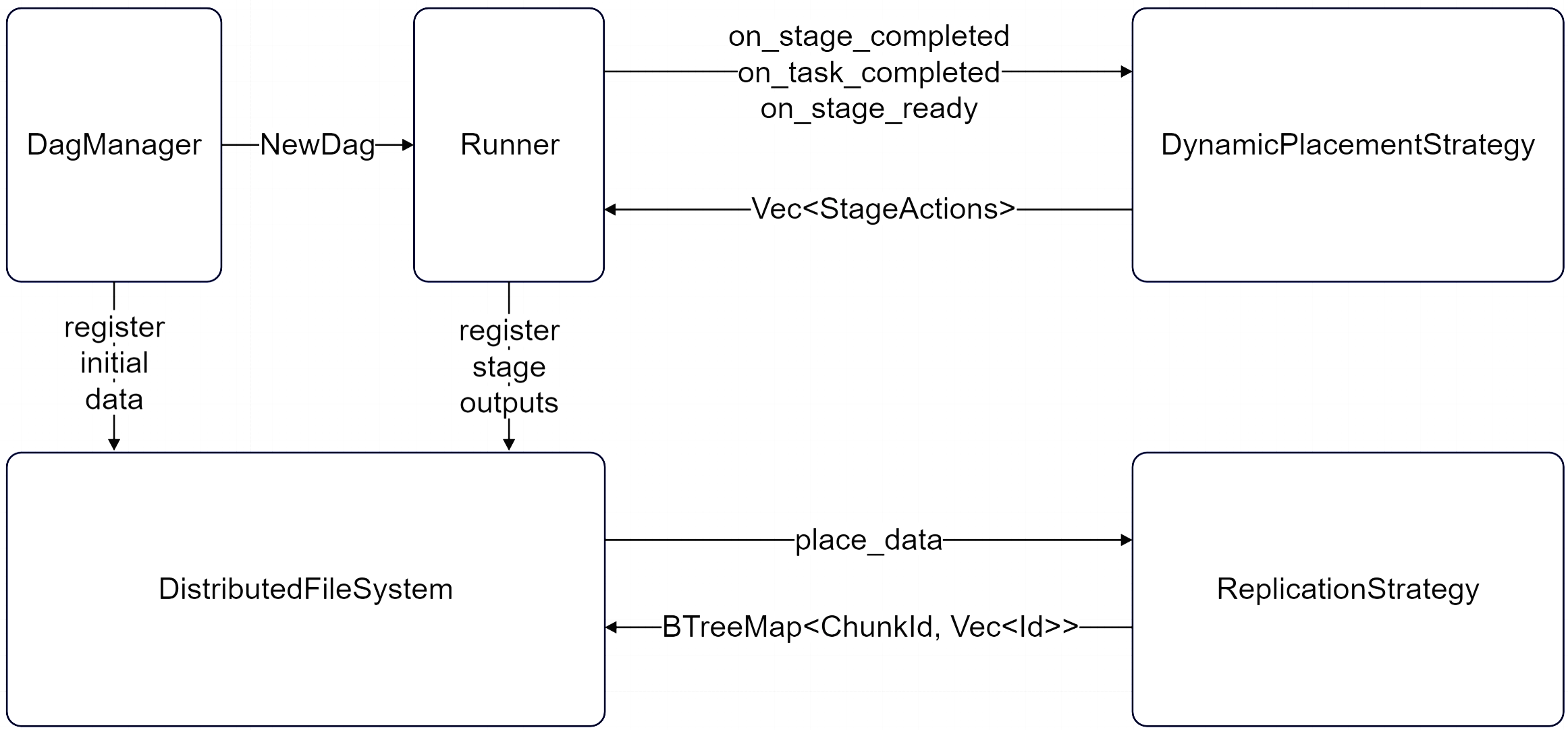
All data is stored on a cluster using dslab-dfs crate which splits every new data into chunks of a fixed sized and replicates each on a set of hosts decided by custom ReplicationStrategy.
The cluster accepts incoming graphs and schedules them on a cluster using custom PlacementStrategy.
ClusterSimulation can be used to simplify running simulations like in the example below.
use dslab_mr::cluster_simulation::{ClusterSimulation, SimulationPlan};
use dslab_mr::placement_strategies::random::RandomPlacementStrategy;
use dslab_mr::system::SystemConfig;
use dslab_dfs::replication_strategies::random::{ChunkDistribution, RandomReplicationStrategy};

fn main() {
    let sim = ClusterSimulation::new(
        123,
        SimulationPlan::from_yaml("../../examples/simple/plan.yaml", "../../examples/simple/".into()),
        SystemConfig::from_yaml("../../examples/simple/system.yaml"),
        Box::new(RandomReplicationStrategy::new(2, ChunkDistribution::ProhibitSameRack)),
        Box::new(RandomPlacementStrategy::new()),
        Some("../../examples/simple/trace.json".into()),
    );

    let run_stats = sim.run();
    println!("\nRun stats:\n{}", serde_yaml::to_string(&run_stats).unwrap());
}
For more examples, see examples or run_experiment. For tools useful in common scenarios see tools.
§Architecture
§Documentation
Modules§
- Simulation wrapper to simplify running cluster simulations.
- Model of a host.
- Model of a DAG.
- Represents a data item.
- Helper struct for running multiple experiments.
- Tools for loading plans and dags from YAML files.
- Implementations of some placement strategies.
- Traits for implementing placement strategies.
- Some stats from a completed simulation.
- Main component of a simulation.
- Represents cluster configuration.
- Trace of a simulation.